
Before
- 1Paper, PDF or Excel timesheets
- 2Payroll staff interpret every entry
- 3Hours and pay information are re-keyed
- 4Mistakes are checked by hand
- 5Data reaches payroll
timepilot + Xero Payroll
timepilot turns paper, PDF and spreadsheet timesheets into structured, review-ready data before it reaches payroll.
Early access · Product previews use sample data
A simpler hand-off
Before
With timepilot
timepilot and Xero Payroll
The hand-off is explicit: collect what your workforce already uses, verify it in timepilot, then move reviewed data into your existing payroll process.
Bring in scanned paper timesheets, PDFs, Excel workbooks or structured JSON. Emailed source documents can enter the same review path.
timepilot turns each entry into structured Line items, preserving confidence and source references for fields that came from an image or PDF.
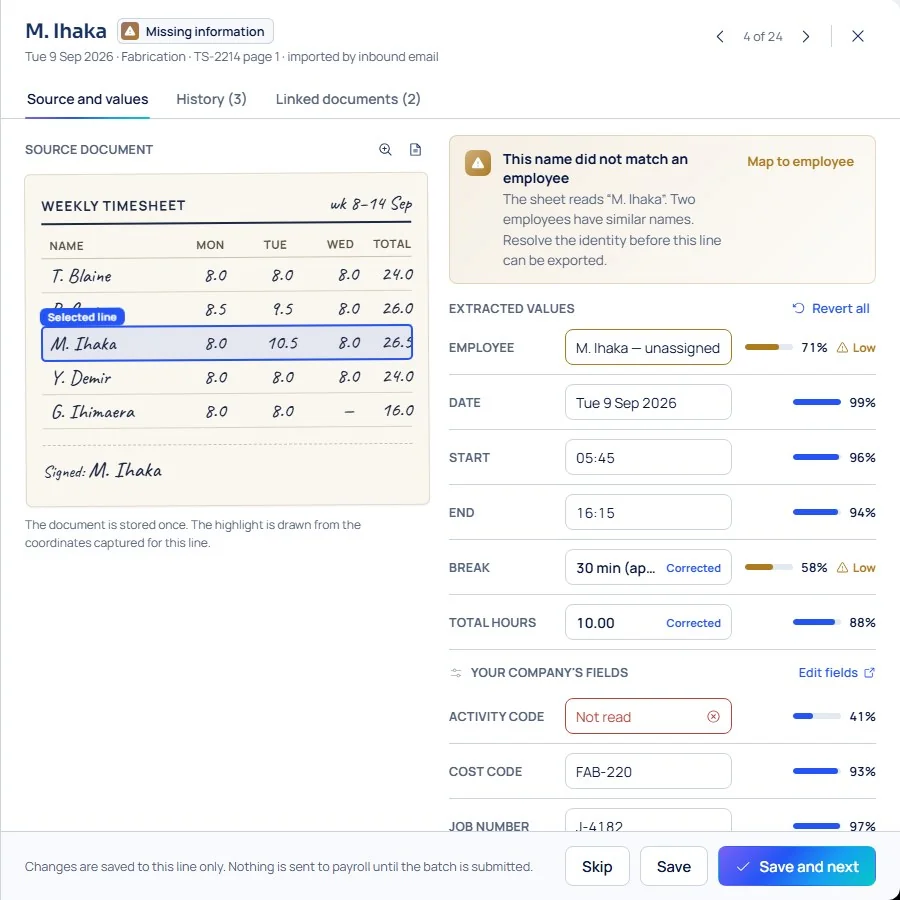
Resolve missing details, uncertain handwriting and employee matches while the original Source document remains visible beside the data.
Approve eligible Line items and prepare a structured CSV, Excel or JSON output for your established Xero Payroll process. timepilot does not currently send data directly to Xero.
Operational checks
Each state is kept specific, so an uncertain value is not confused with an invalid one or an unresolved Employee.
Low-disruption change
Workers do not necessarily need another app. timepilot sits between timesheet collection and payroll, where administrative work is concentrated.
Xero Payroll details
Useful Xero Payroll preparation depends on your real employee records, pay setup and hand-off process.
Names and identifiers from a Source document must be resolved to your Employee registry before the corresponding Line items are eligible for export. Unresolved employees can be held back without blocking eligible data.
Earnings categories, pay items and import conventions vary between organisations. timepilot prepares reviewed source data; mapping it to your Xero Payroll setup is a separate implementation step that must be confirmed for your workflow.
Export reviewed files or explore the Xero Payroll beta. Direct transfers require verified payroll access and activation; your team retains the final payroll decision.
Questions, answered
Straight answers about what timepilot does today and where it fits.
timepilot can extract and review data from scanned paper timesheets, then prepare structured output for your payroll hand-off. It does not currently import that data directly into Xero Payroll.
That is part of the intended workflow. timepilot keeps confidence information with extracted fields so uncertain handwriting can be checked against the original before export.
Yes. Structured Excel inputs can bypass vision extraction and enter the same validation, employee-matching, review and approval workflow.
No. Xero Payroll remains the downstream payroll system and system of record. timepilot handles the operational work between timesheet collection and payroll hand-off.
Not necessarily. Employees can continue using the familiar paper, PDF, spreadsheet or emailed timesheet process chosen by their Company.
Yes. Administrators can review Source documents beside extracted Line items, correct Exceptions and complete a configured approval step before export.
Not today. timepilot currently prepares structured, reviewed data for a controlled hand-off. A native Xero integration must not be assumed.
A calmer path to payroll
Modernise the work between timesheet collection and payroll without requiring a company-wide change in how people record time.
Explore the Xero Payroll beta. Beta access requires verified setup and activation.
timepilot is live. Bring your familiar timesheets, review what needs attention and prepare your data for payroll.
Start using timepilotStart your timepilot trial.